Visitors appreciate transparency. When they land on your site, they want to know at a glance what they can read for free, what requires payment, and what is already part of their account. Visual post badges are an elegant way to deliver this clarity.
With a single glance, users understand your content’s availability – improving user experience and helping you convert more visitors into paying customers.

Why Post Badges Are Essential
With the WordPress Pay Per Post plugin, badges aren’t just a nice design touch – they serve a practical purpose. They remove friction from the browsing experience, reducing the chances that a user will click on a post, hit an unexpected paywall, and leave frustrated.
A well-placed badge communicates the post’s status instantly:
- Free: Signals that the post is open to everyone, encouraging engagement from new visitors.
- Paid: Makes it clear that the content is premium, setting expectations before the click.
- Purchased: Provides reassurance for logged-in users who already have access.
- Unavailable: Lets users know that a post is no longer purchasable, preventing confusion.
- Temporarily Free: Creates a sense of urgency by showing that the content will soon require payment.
This kind of visual language improves site navigation, reduces guesswork, and ultimately builds trust.
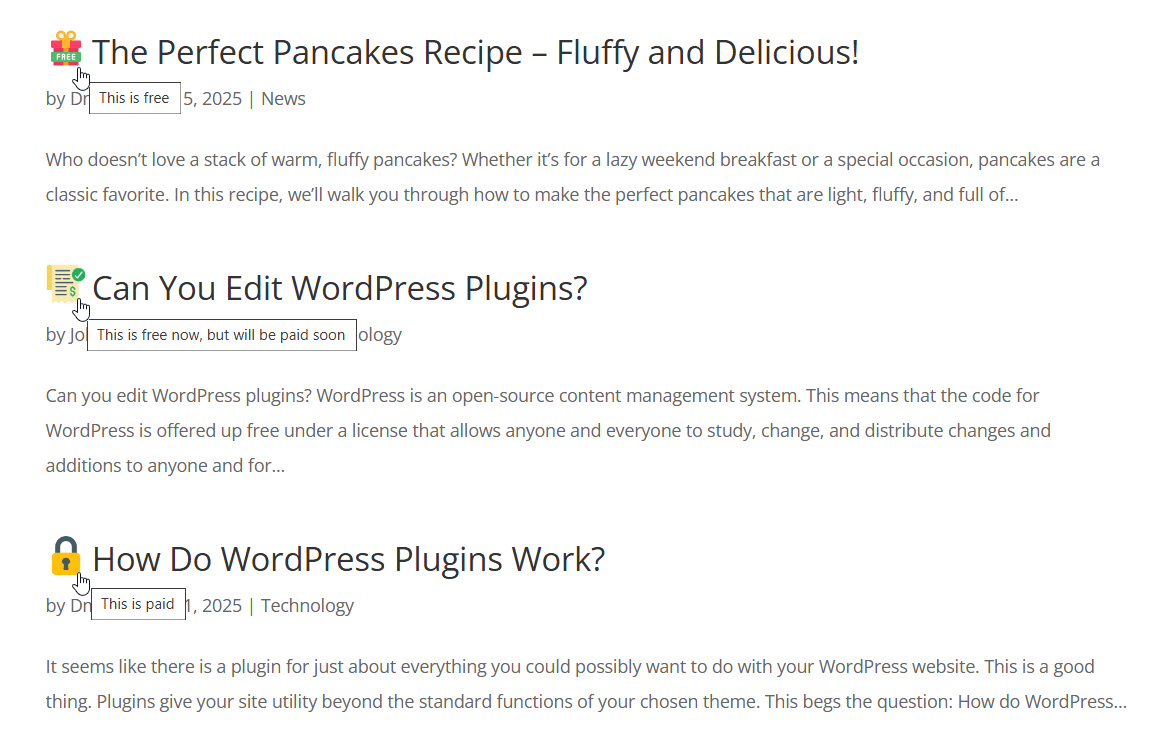
Example of Availability Badges
March 2026 Offer – For a Limited Time Only:
Get WordPress Pay Per Post Plugin for 20% off! Don’t miss out!
Strategic Benefits for Site Owners
From a business perspective, badges are a subtle but powerful way to guide user behavior. Here are some common strategies that site owners use:
- Highlighting Free Content: Showing which posts are free helps you showcase your best material and attract new subscribers.
- Promoting Premium Content: Badges can act like mini advertisements for your paid content, nudging readers toward a purchase.
- Encouraging Returning Visits: Temporarily free badges give users a reason to come back regularly, so they don’t miss out before the free period ends.
- Creating a Clean User Experience: By letting users know what’s locked or unlocked, you avoid frustration and keep them exploring instead of bouncing away.
How Badges Work with Access Rules

The real power of badges shines when you combine them with access rules. For example:
- You can configure posts so that they are free for the first three days after publication. During this time, a “Free” badge is displayed, then it automatically switches to “Paid” once the period ends.
- You can set a limit on how many users are allowed to purchase access to a post. After the limit is reached, the badge changes to “Unavailable”, clearly signaling that the offer is closed.
These rules make your content more dynamic and give you control over how users interact with it over time.
Building Engagement Through Transparency

Clear communication is one of the best ways to build a loyal audience. When users can easily see which content is free, which is premium, and which they have already purchased, they are more likely to engage, explore, and eventually convert into paying customers.
Transparency also plays an important role in reducing support requests. Without badges, users might repeatedly click on content they don’t have access to and contact support asking why they can’t view it. With badges, those questions are answered visually, saving time for both you and your users.
Tips for Maximizing Badge Impact
Badges work best when they are noticeable but not intrusive. Here are some tips for using them effectively:
- Use Consistent Design: Match badge colors and icons with your site’s branding for a polished look.
- Keep Text Clear: Use short, descriptive hover texts so users instantly understand what each badge means.
- Experiment with Placement: Some sites prefer badges near the post title, others place them over featured images. Test what works best for your audience.
- Leverage Temporarily Free Posts for Marketing: Announce your limited-time free posts in newsletters or on social media, using badges as a visual reinforcement.
Conclusion

Visual post badges, powered by the WordPress Pay Per Post plugin, are a small feature that can deliver a major improvement in user experience.
They keep your content strategy transparent, reduce confusion, and guide users toward the actions you want them to take – whether that’s reading, returning, or purchasing.
For site owners who monetize content, combining badges with access rules such as purchase limits and delay restrictions creates an even richer experience. Users know what’s available, what’s premium, and when they need to act to get the best value – all without having to click around or guess.
If you want to improve clarity, boost conversions, and keep your visitors engaged, adding visual badges to your posts is one of the easiest upgrades you can make.