Restricting access to specific content is a common requirement for WordPress sites – whether it’s private articles, paid resources, client-only pages, or temporary offers.
While access codes are a reliable way to protect such content, the way users interact with them can have a significant impact on usability, engagement, and overall experience.

Rethinking Access with the WordPress Invitation Code Plugin
The WordPress Invitation Code plugin allows site owners to protect individual posts, pages, URLs, or files using invitation codes. Each code defines who can access the content, for how long, and under which conditions.
Traditionally, this process requires users to manually enter a code before viewing restricted content. While effective, this step can feel unnecessary – especially when access is shared digitally via email, messaging apps, or automated systems.
A more streamlined approach is to let users access protected content directly via a link, without having to enter anything manually.
March 2026 Offer – For a Limited Time Only:
Get WordPress Invitation Code Content Access Plugin for 20% off! Don’t miss out!
The Idea Behind Direct Access Links
Direct access links are based on the same invitation codes, but instead of asking users to type the code into an access form, the code is applied automatically when the page is opened.
From the user’s perspective, the experience is simple: click a link and view the content.
Behind the scenes, the plugin validates the code, checks all restrictions, and unlocks the page only if the conditions are met.
Nothing about the access logic changes – only the way users interact with it.
Maintaining Full Control Over Content Access

Using direct access links does not weaken access protection. All standard invitation code rules continue to apply, including:
- Limited number of uses, ensuring links can’t be shared indefinitely.
- IP-based restrictions, preventing abuse across multiple locations.
- Time-based availability, such as expiration dates or access windows.
- Temporary access after activation, where content is available for a fixed duration.
This makes direct links suitable for controlled distribution, not just convenience.
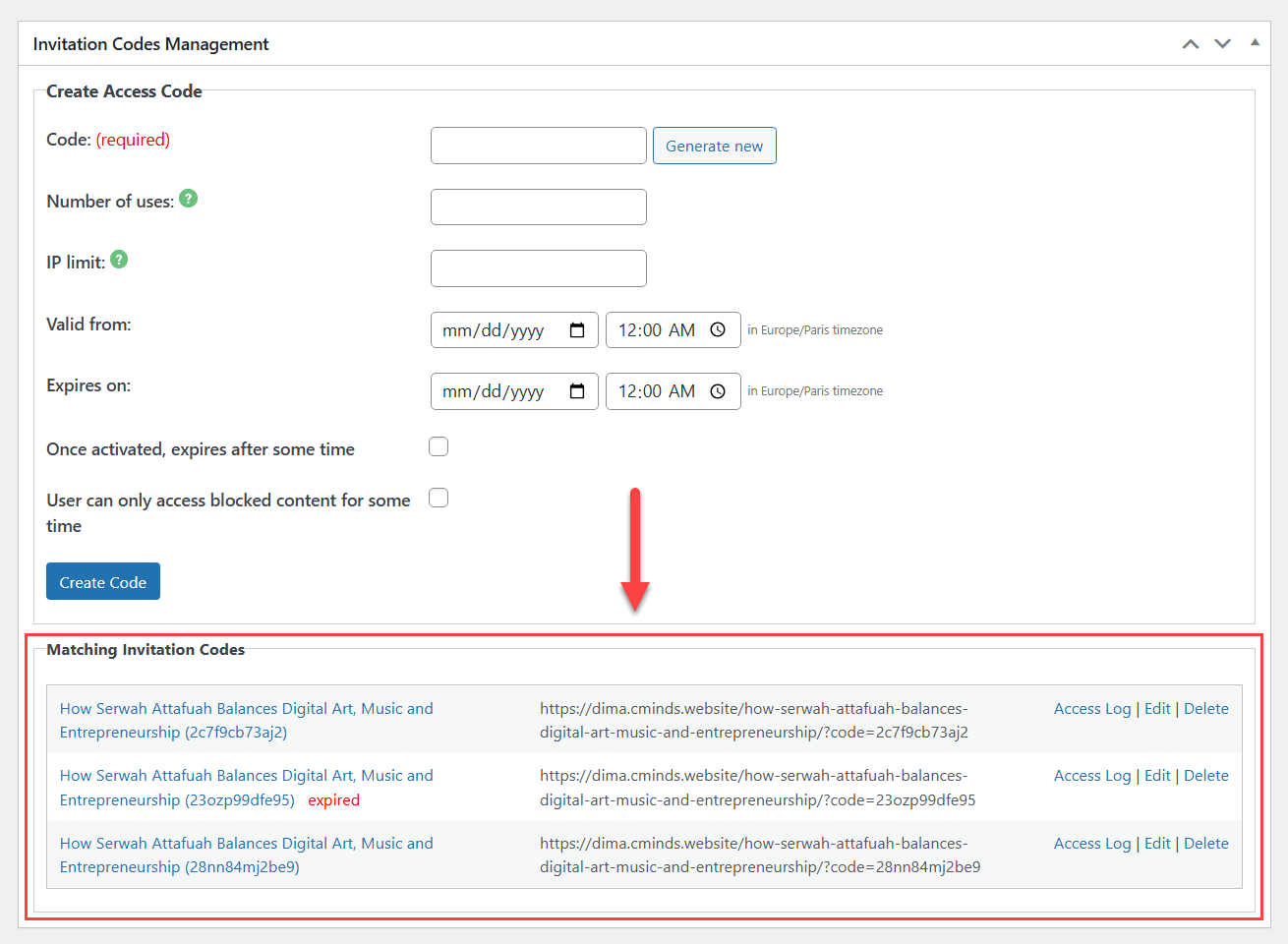
Managing Access Links that Include Invitation Codes
Give Users Seamless Access to Restricted Content
Common Scenarios Where Direct Links Make Sense

Direct access links are especially useful in situations where simplicity matters.
- Email campaigns and newsletters – Share gated articles or resources with subscribers via a single click, without extra steps.
- Client or partner access – Provide private project pages or documents that automatically expire after a defined period.
- Paid or one-time content access – Deliver restricted content after purchase using a unique or limited-use link.
- Previews and internal reviews – Give stakeholders temporary access to unpublished or protected pages without managing user accounts.
- Customer support and onboarding – Send time-limited access to specific pages as part of troubleshooting or guided setup.
In each case, the goal is the same: reduce friction for legitimate users while keeping access strictly controlled.
Managing and Monitoring Invitation Codes
All invitation codes – including those used via direct links – remain fully manageable in the WordPress admin area.
Site owners can view existing codes, edit their rules, disable them, or remove them entirely. Access logs make it possible to track usage and identify when and how protected content is accessed.
Because each code is tied to specific content, access remains predictable and auditable.
Striking the Right Balance

Direct access links allow site owners to strike a better balance between security and usability. Instead of asking users to interact with access forms, links handle the process automatically, creating a smoother experience without compromising control.
For sites that regularly distribute private or time-limited content, this approach helps improve engagement, reduce confusion, and simplify access workflows – all while keeping content protected.
To see how WordPress Invitation Code works in practice, you can check our dedicated use case demonstrating direct access links for protected WordPress content in action: