In many WordPress projects, invitation codes do more than unlock content. They help control access to private pages, limited campaigns, and time-restricted resources.
The challenge arises when code creation is needed not only by administrators, but also by trusted users such as editors, authors, or partners. Granting admin access in these cases is often unnecessary.
Front-end invitation code creation provides a practical alternative.

Why Front-End Invitation Code Generation Matters
Traditional access-control workflows usually rely on administrators to manually create and manage invitation codes from the dashboard. While this works for small sites, it quickly becomes inefficient for growing platforms, membership communities, or content-driven projects.
Allowing selected user roles to create invitation codes directly from the front-end introduces several benefits:
- Less admin overhead – administrators no longer need to manually generate codes for every request.
- Improved workflow – trusted users can manage access independently, within clearly defined limits.
- Better user experience – code creation happens in a familiar, distraction-free interface.
- Stronger access control – permissions are still enforced by user roles and plugin settings.
The WordPress Invitation Code plugin enables exactly this type of setup.
April 2026 Offer – For a Limited Time Only:
Get WordPress Invitation Code Content Access Plugin for 20% off! Don’t miss out!
Front-End Code Creation: Two Flexible Approaches

Instead of exposing a full back-end interface, the plugin allows invitation codes to be created through simplified front-end tools. These tools are designed to focus only on what matters for everyday use.
Front-End Invitation Code Form
One option is a dedicated front-end form that can be placed on any page. This approach works especially well when you want a central location where trusted users can manage access codes.
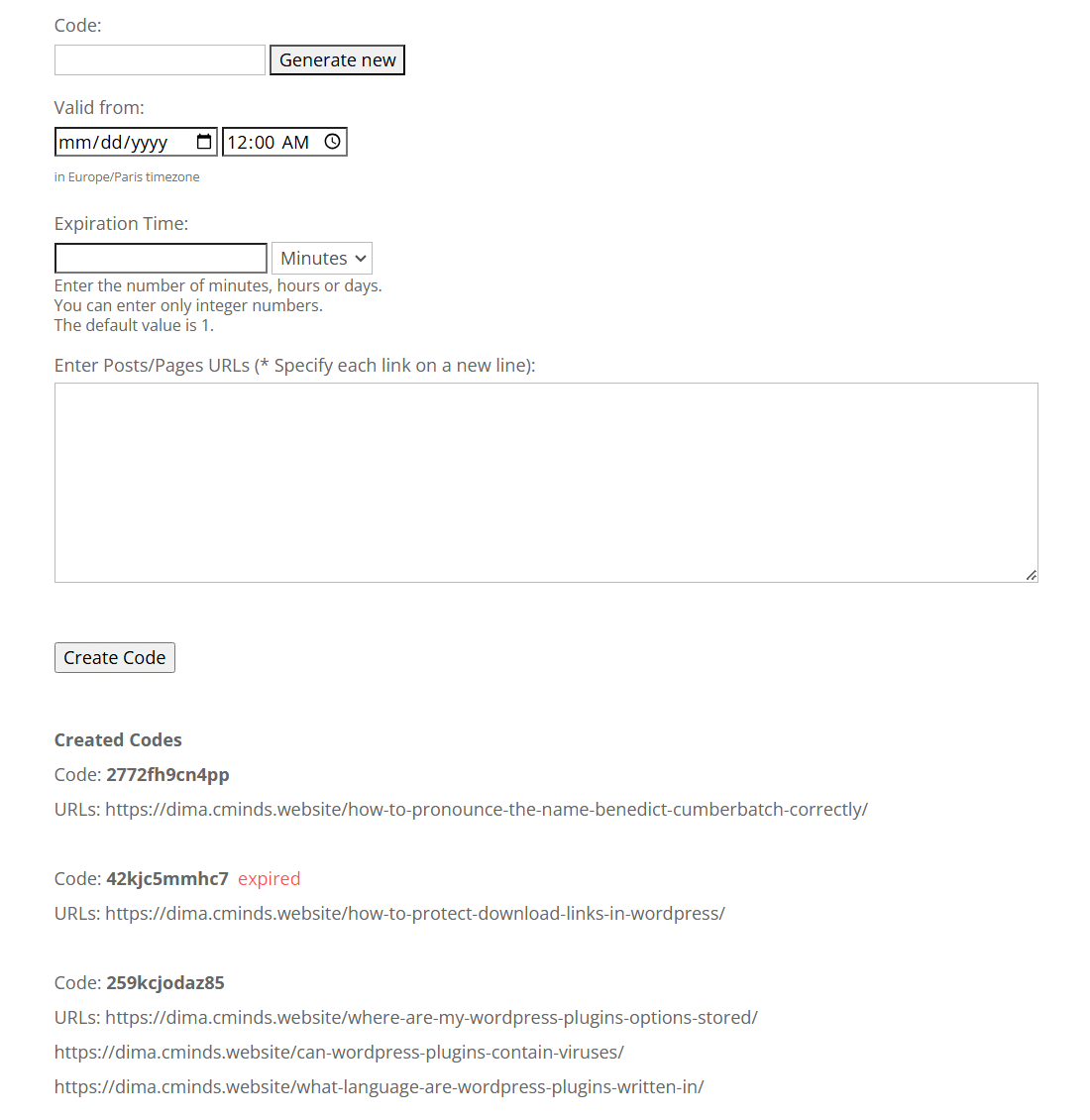
Front-End Form for Creating Invitation Codes
From a single form, users can:
- Define custom or auto-generated invitation codes
- Set when a code becomes active
- Control how long the content remains unlocked after activation
- Assign codes to specific posts or pages
Each user only sees the codes they created themselves, making the system easy to manage even when multiple users are involved.
This setup is ideal for editors managing private articles, course creators granting temporary access, or moderators inviting new members.
Floating Code Creation Widget
For more contextual access control, the plugin also supports a floating front-end widget. Instead of working from a separate page, users can generate invitation codes directly on the page where access is needed.
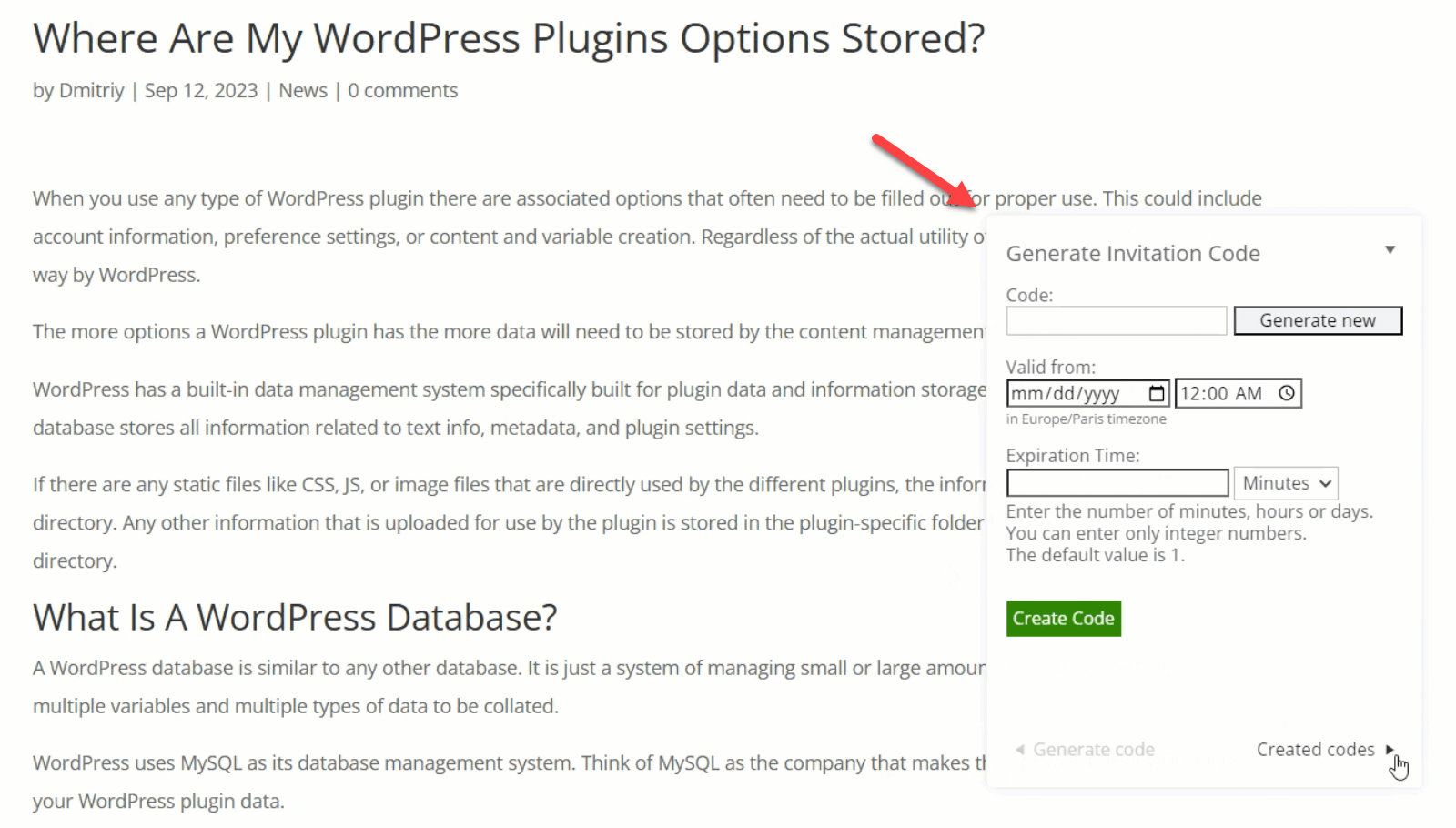
Floating Widget for Creating Invitation Codes
This is especially useful for:
- Protected landing pages
- Time-limited promotions
- Private event pages
- Restricted documentation or resources
The widget appears only on selected pages and only for allowed user roles. Each code created through the widget is automatically linked to the current page, eliminating configuration errors and speeding up the process.
Role-Based Access Without Compromises

A key advantage of this approach is that not every user is treated the same. Site owners remain in full control over who is allowed to create invitation codes on the front-end.
By using standard WordPress user roles, access can be limited to:
- Administrators only
- Editorial teams
- Authors and contributors
- Custom roles created for specific workflows
This makes the system suitable both for small editorial teams and for larger platforms with multiple responsibility levels.
Ready to Control Access with Invitation Codes?
Consistent Branding and Localization
Front-end tools are visible to users, which means wording and tone matter. The plugin allows full control over all labels used in the invitation code forms and widgets.
This makes it easy to:
- Match the language with your site’s branding
- Translate the interface into other languages
- Adjust terminology for non-technical audiences
As a result, invitation code management feels like a natural part of the site rather than an external system.
A Practical Use Case for Real-World Projects
Front-end invitation code creation is not just a technical convenience. It directly supports real-world scenarios such as:
- Editors sharing draft or premium content with selected users
- Course creators granting temporary lesson access
- Event managers issuing page-specific invites
- Partners inviting collaborators without admin access
By shifting invitation code management to the front-end, WordPress sites gain flexibility without losing control.
Final Thoughts

The WordPress Invitation Code plugin makes it possible to decentralize access management while keeping permissions clear and structured. Instead of turning every request into an admin task, trusted users can create invitation codes themselves – securely, contextually, and without touching the back-end.
For sites that rely on restricted content, private pages, or controlled access workflows, this approach offers a balance between usability and governance that scales with the project.
To see how this setup works in practice, you can explore our dedicated use case that demonstrates front-end invitation code creation in a real-world scenario: