Creating a useful online resource collection is easy. Keeping it alive, updated, and meaningful over time? That’s the real challenge. Most link directories, knowledge hubs, or public resource lists start strong – and then slowly fade as the site owner struggles to keep content updated.
But what if your audience could help maintain it?

Why a User-Submitted Link Directory Works So Well
The WordPress Curated Lists plugin introduces a simple but powerful idea: let users contribute. With front-end submissions, your visitors can suggest new links, update outdated ones, and even create or edit categories – all without touching the WordPress admin dashboard.
The result is a living, community-driven directory that grows alongside your project, product, or community.
Whether you’re building a niche resource hub, a local business directory, a collection of industry tools, or an internal knowledge base, your users often know just as much as you do. Sometimes more.
Allowing them to contribute keeps your directory:
- Fresh and updated – Users submit new links as soon as they discover them.
- More complete – Different people know different resources, so the database becomes broader.
- Collaborative – You’re turning passive readers into active participants.
- Self-sustaining – You spend less time adding entries manually.
And because WordPress Curated Lists includes moderation controls, you remain in charge of what actually goes live.
March 2026 Offer – For a Limited Time Only:
Get Curated List Manager Plugin for 15% off! Don’t miss out!
A Front-End Interface Anyone Can Use
Instead of sending users to WordPress admin (where they don’t belong), the plugin creates simple front-end forms for:
- Suggesting new categories
- Editing category details
- Adding new links
- Editing existing links
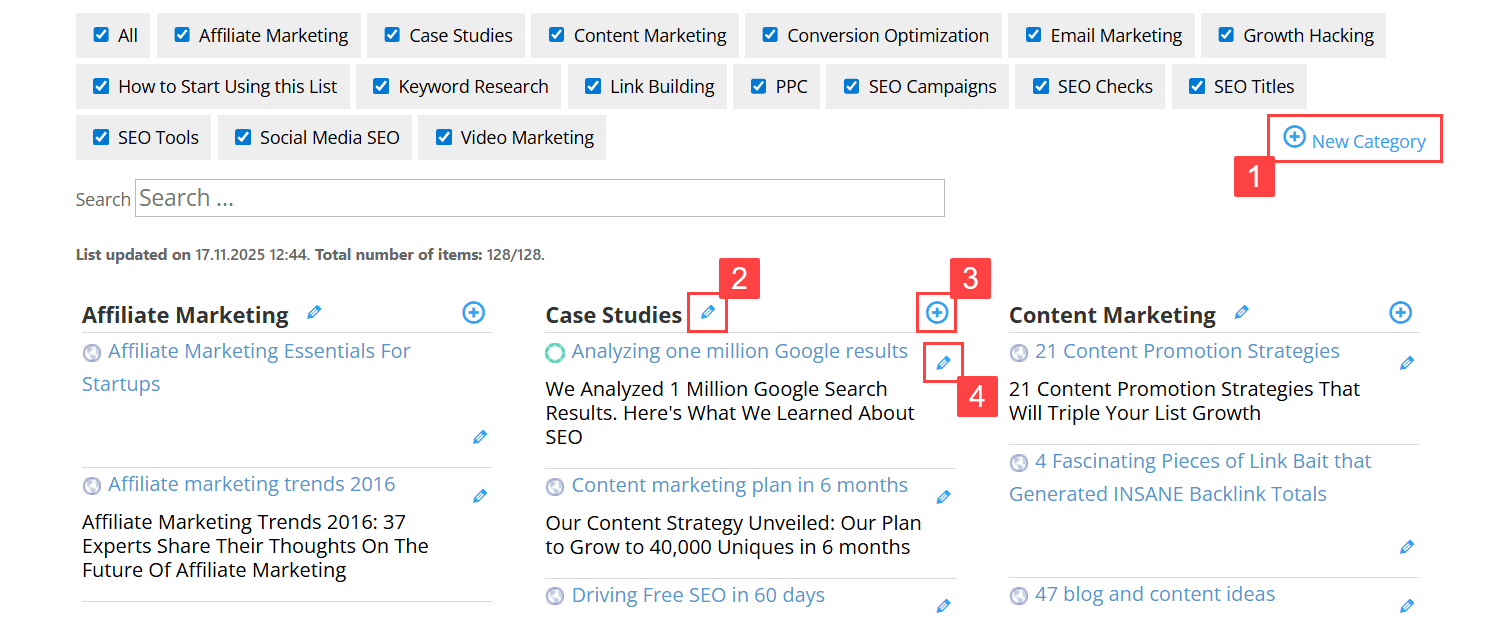
Buttons for front-end submissions and editing
Each action appears as a small, intuitive button in your directory. When users click it, a clean and minimal form slides open, letting them enter a name, description, and URL. If you enable it, a basic captcha protects the form from spam.
To the user, it feels like interacting with any modern web app – quick, straightforward, and friendly.
You Stay in Control: Moderation and Permissions

Opening your directory to user contributions doesn’t mean giving up control. In fact, the plugin gives you very granular permission settings. You can decide exactly who is allowed to perform each action – separately for adding links, editing or deleting links, creating categories, and editing or deleting categories.
For every one of these actions, you can choose whether access is given to:
- Everyone, including anonymous visitors
- Logged-in users
- Specific user roles only
- Or nobody, if you want to temporarily disable submissions

Choosing who is allowed to add and edit links and categories on the front-end
This flexibility means you can open link submissions to all visitors, restrict category creation to editors, allow logged-in users to update outdated entries, or any other combination that fits your workflow.
On top of that, you can decide whether new or edited entries require moderation. When moderation is enabled, admins receive notifications and can approve, edit, or delete submissions directly from the dashboard.
The result is a system that supports both wide-open community contribution and tightly controlled editorial workflows – whichever your project needs.
Ready to Build a User-Powered Link Directory?
Fully Customizable User Experience

Another advantage: you can tailor the submission experience to your website’s voice and purpose.
The plugin allows you to adjust every label and message – from button text to error messages to success confirmations. This helps the forms naturally blend into your website’s style, making the directory feel like a seamless part of your brand.
Building a Dynamic, User-Powered Resource Hub
Once everything is set, you end up with something much more powerful than a static curated list.
You get:
- A resource hub that the community actively improves
- A directory that stays relevant without constant manual updates
- A tool that encourages engagement and repeat visits
- A structure that scales naturally as the number of links grows
Whether you’re gathering the best tutorials for your industry, collecting favorite tools for your team, listing recommended services, or building a crowdsourced database, the WordPress Curated Lists plugin helps transform your content from a one-person effort into a collaborative project.
The Bottom Line

Instead of managing your directory alone, you can turn it into a shared, interactive, user-powered collection. With the WordPress Curated Lists plugin, your community can help shape the content – while you maintain full control through moderation and flexible access settings.
If you want your website to offer an evolving, constantly improving resource hub, front-end submissions may be exactly what you need.