Maintaining a comprehensive glossary for your website can be a daunting task – especially if your content is constantly growing. Imagine having an intelligent assistant that can scan your posts, identify key terms, and even generate accurate definitions for you.
AI-powered term discovery makes this possible, saving time, reducing manual work, and keeping your glossary fresh and relevant.

Expanding Your Glossary with AI
Keeping a glossary up-to-date is essential for websites with lots of content, whether it’s a news site, educational platform, or corporate knowledge base. Traditionally, building a glossary meant manually combing through every post and page to identify important terms – a slow and error-prone process.
AI changes the game. By automatically scanning your content, AI can detect terms that are new, relevant, or frequently used, suggesting them for inclusion in your glossary. This ensures that no important term slips through the cracks and that your glossary grows alongside your content.
With WordPress Glossary plugin, these suggestions appear in a centralized dashboard where you can decide which terms to create, refine, or skip – bringing intelligence and efficiency to your content management.
March 2026 Offer – For a Limited Time Only:
Get WordPress Tooltip Glossary Plugin for 15% off! Don’t miss out!
Who Can Benefit From AI-Powered Term Discovery
AI-powered term discovery brings real value to any website with growing or frequently updated content. It goes beyond convenience, helping you improve content discoverability, user experience, and overall site organization. Some examples of who can benefit include:
- Content-heavy websites: Platforms like news portals, blogs, or encyclopedias can keep glossaries updated without manual effort.
- SEO-focused sites: A well-maintained glossary helps with internal linking and gives search engines better context, boosting your site’s visibility.
- Educational sites and knowledge bases: Accurate, up-to-date glossaries improve learning and comprehension, making complex topics easier for readers.
Configuring AI-Powered Term Discovery
Getting AI to accurately detect and define terms requires some configuration, but it’s surprisingly flexible. Here are some of the key settings that allow you to control how the plugin works:
- AI model selection: Pick either ChatGPT or Gemini to scan your content and generate definitions.
- Prompt customization: Set instructions for AI – such as extracting the most relevant terms or focusing on particular types of content – so it delivers useful results and avoids unnecessary or obvious terms.
- Term content length: Control how long AI-generated definitions can be, keeping them concise and avoiding excessive token use.
- Auto-creation vs. manual review: Decide whether terms should be published immediately or if you prefer to review and tweak definitions first.
With these settings, you can balance automation and control, ensuring that AI suggestions align with your website’s style and goals.
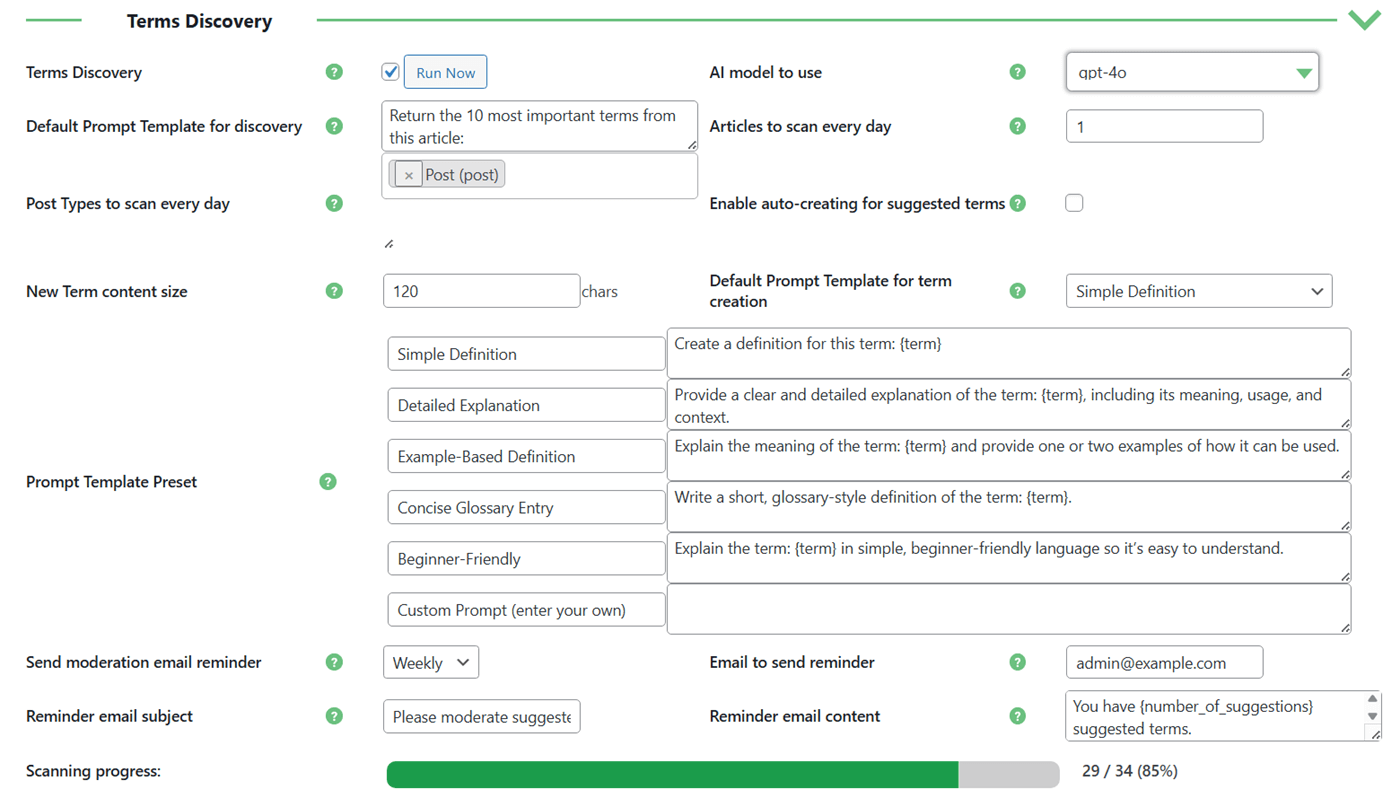
Configure Terms Discovery settings in the WordPress Glossary Plugin for AI-powered search and term creation
Ready to Build Your Glossary?
Understanding the Terms Discovery Dashboard
After AI scans your content, all suggested terms appear in the Terms Discovery Dashboard, your central hub for managing everything related to new terms. This dashboard has three main tabs:
Suggested Terms: Here, you see all AI-suggested terms that haven’t been created yet. You can review them, adjust definitions, or create terms manually or with AI assistance. You can also delete irrelevant suggestions, which moves them to the Deleted Terms tab.
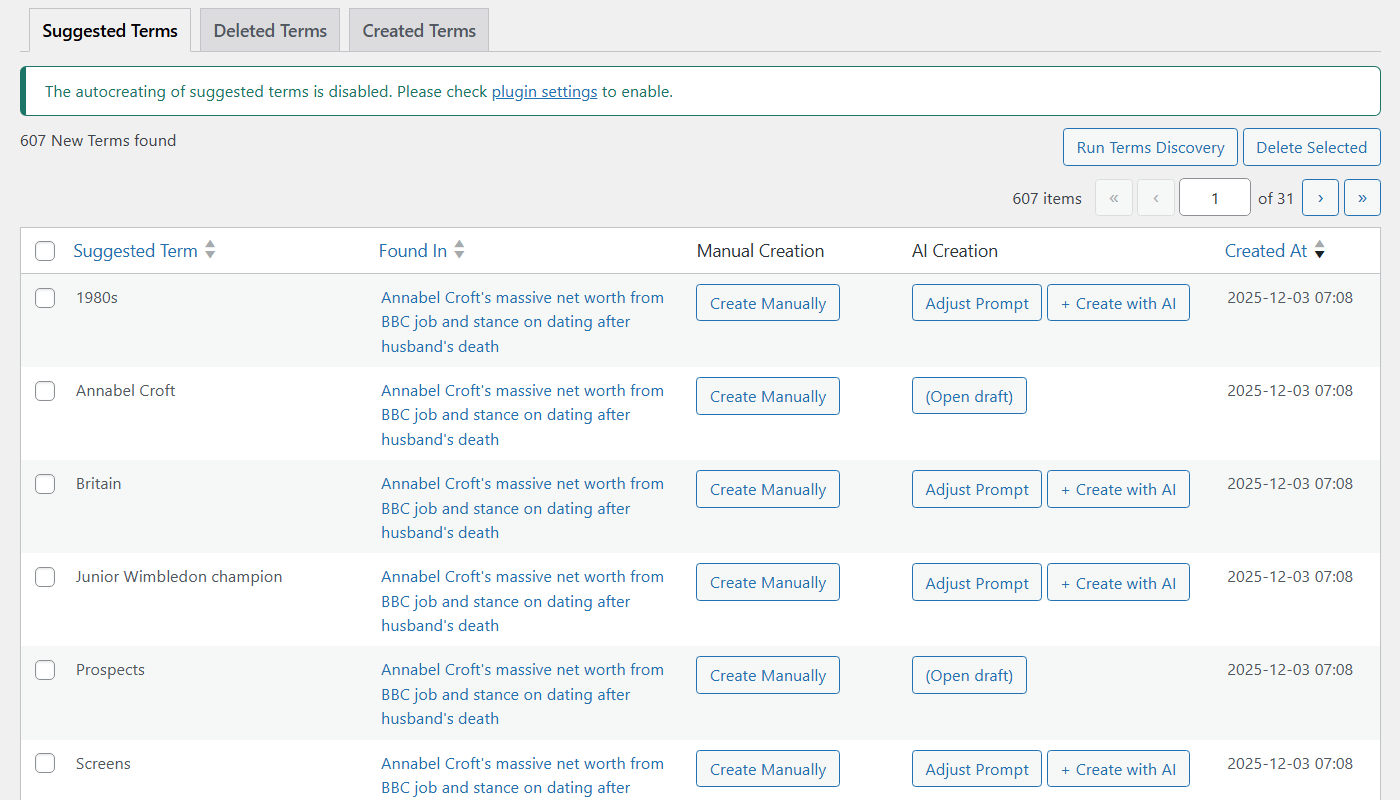
Review and manage suggested glossary terms generated by AI in the Terms Discovery dashboard
Deleted Terms: If you remove a suggested term, it lands here. You can restore it if needed, making it easy to manage temporary or accidental deletions.

Review deleted terms and restore them if needed
Created Terms: Once a term is added – manually, automatically, or via AI prompts – it appears here. This tab shows when and where terms were found, how they were created, and which AI prompt (if any) was used.
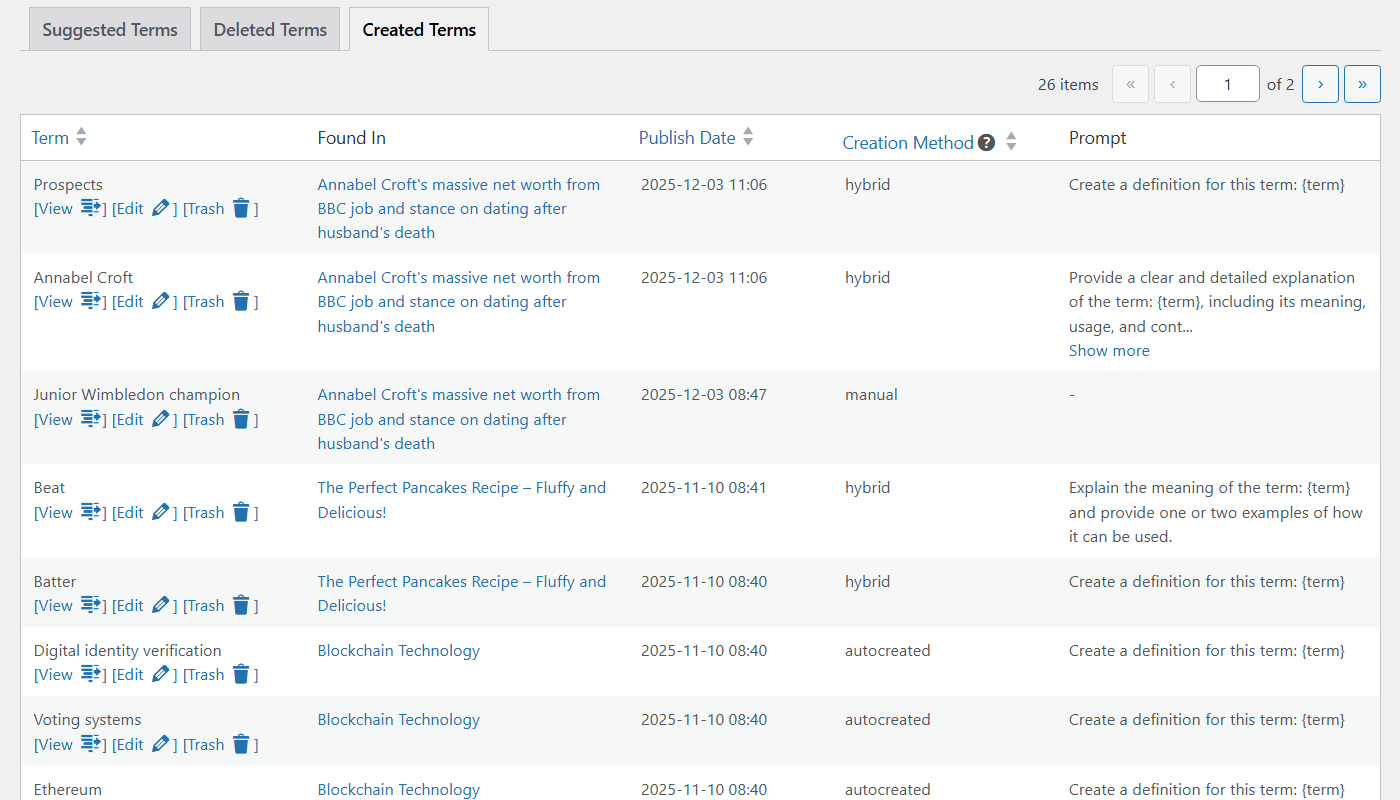
Track all glossary terms created based on the suggestion list, including those generated automatically or manually
The dashboard gives you visibility and control over your glossary, allowing you to maintain quality while still benefiting from automation. You can also run scans for individual posts manually, which is handy if you update content or want to prioritize specific pages outside the daily scan schedule.
Best Practices for Effective AI Term Discovery

Using AI to discover and create glossary terms is incredibly efficient – but only if it’s set up thoughtfully. The following best practices help you get accurate, relevant, and concise entries while keeping your site and AI service running smoothly:
- Optimize prompts and content size: Fine-tune your AI prompts and limit the length of generated definitions to avoid irrelevant suggestions and unnecessary token usage.
- Review and enhance AI content: Even with automation, reviewing AI-generated terms ensures accuracy, clarity, and consistency with your site’s voice.
- Manual scanning for updated posts: Refresh a post and run a manual scan if you need new terms immediately, bypassing the daily schedule.
- Monitor server load: Avoid scanning too many posts at once, especially on content-heavy sites, to prevent performance issues.
- Handle large glossaries carefully: On sites with many posts, automatic term creation can generate many new entries. Regular monitoring and server tuning ensure smooth operation.
Conclusion

AI-powered term discovery in the WordPress Glossary plugin transforms your glossary into a dynamic, self-updating resource. By detecting key terms, generating definitions, and offering flexible review options, it saves time, enhances user experience, and strengthens SEO.
To learn more about how AI-powered term discovery works in practice, including step-by-step instructions and screenshots, check out our detailed use case guide: