Running a website that contains age-sensitive content – such as alcohol, gaming, or adult materials – means you need a reliable way to verify your visitors’ age.
A well-designed popup not only ensures compliance but also provides a professional, trustworthy user experience.

Why Age Verification Matters
Age verification is more than just a legal formality. For many industries, it’s a crucial safeguard that ensures your site operates responsibly and within regulatory boundaries.
Without it, you run the risk of underage users accessing content they shouldn’t, which can harm your brand reputation or even lead to legal issues.
But beyond compliance, adding an age check creates a more professional impression. Visitors immediately see that your site values accountability, which helps build trust. This is particularly important in competitive industries where credibility can set you apart.
March 2026 Offer – For a Limited Time Only:
Get WordPress Welcome Message & Disclaimer Plugin for 15% off! Don’t miss out!
Different Ways to Verify Age
The WordPress Disclaimer Plugin offers multiple methods of verification, each designed for a different type of site. This flexibility means you can decide how strict or lightweight the process should be.
The most precise option is full date verification, which requires visitors to enter their day, month, and year of birth. This ensures that if your minimum age is 21, someone who is just one day short won’t slip through. It’s a great fit for businesses that need maximum accuracy, such as alcohol or cannabis websites.
For sites where speed and simplicity matter more, you can opt for year-only verification, where users simply type in their birth year. It’s less strict but more user-friendly, perfect for situations where general confirmation is enough.
And for the fastest approach, there’s simple Yes/No verification, which only asks visitors to confirm their age with one click. While less detailed, it keeps friction to a minimum, which can be ideal for entertainment or community-driven platforms.
Custom Popups That Match Your Site

A popup should protect your content, not annoy your users. With the WordPress Disclaimer Plugin, you’re not stuck with a generic message window – you can style the entire experience to look like a natural extension of your website.
For example, you can adjust the size of the popup for desktop and mobile visitors, choose colors that match your branding, and even add a custom background image or blur effect to the page.
Small touches like rounded corners or branded button styles can make the popup feel polished rather than intrusive.
Another smart feature is controlling how often the popup appears. You can make it show up every time, only once per visitor, or until the user confirms their age. Once accepted, the plugin remembers their choice so they don’t get bothered again on future visits.
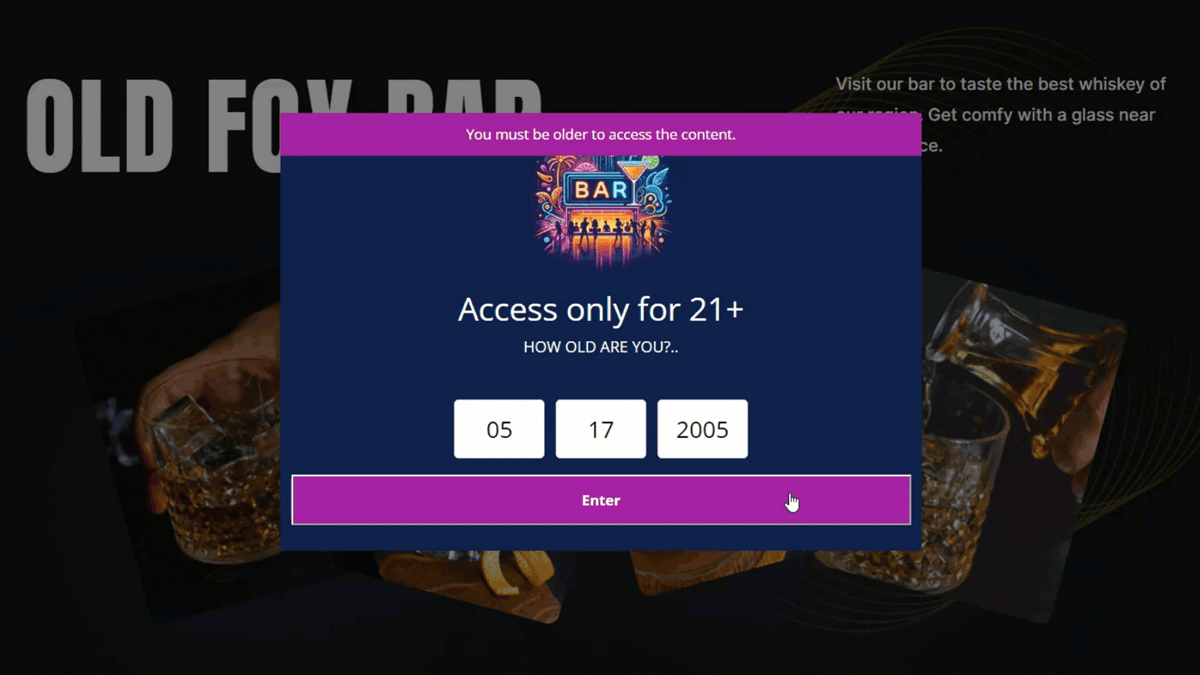
Example of the Age Verification
Where and How the Popup Appears
One of the key strengths of the WordPress Disclaimer Plugin is control over placement. You can choose to display the popup on every page of your site, just the homepage, or only on specific URLs or posts. This flexibility makes it easy to adapt to different use cases.
For instance, if only a certain section of your site contains restricted material, you don’t have to block the entire site. You can configure the popup to appear only on those pages. On the other hand, if your entire website needs verification, you can apply it globally with a single setting.
You can also prevent visitors from bypassing the popup by disabling the close button. That way, users are forced to either confirm their age or leave, ensuring your restrictions are respected.
Settings Overview

The WordPress Disclaimer Plugin comes with a broad range of settings that let you fine-tune both functionality and design. Here’s a quick overview of what you can configure:
- Verification type – Choose between full date, year-only, or Yes/No verification.
- Minimum age requirement – Define the legal age for your site.
- Redirects – Send underage users to a custom page with an “Access Denied” message.
- Timers – Add a delay before redirecting users who fail verification.
- Style options – Customize button colors, fonts, labels, and popup background.
- Display rules – Decide where on your site the popup should appear.
- User experience – Enable blur effects, adjust popup shapes, and choose whether to remember accepted visitors.
This variety of options means you can adapt the plugin to almost any scenario, whether your focus is strict compliance or smooth user experience.
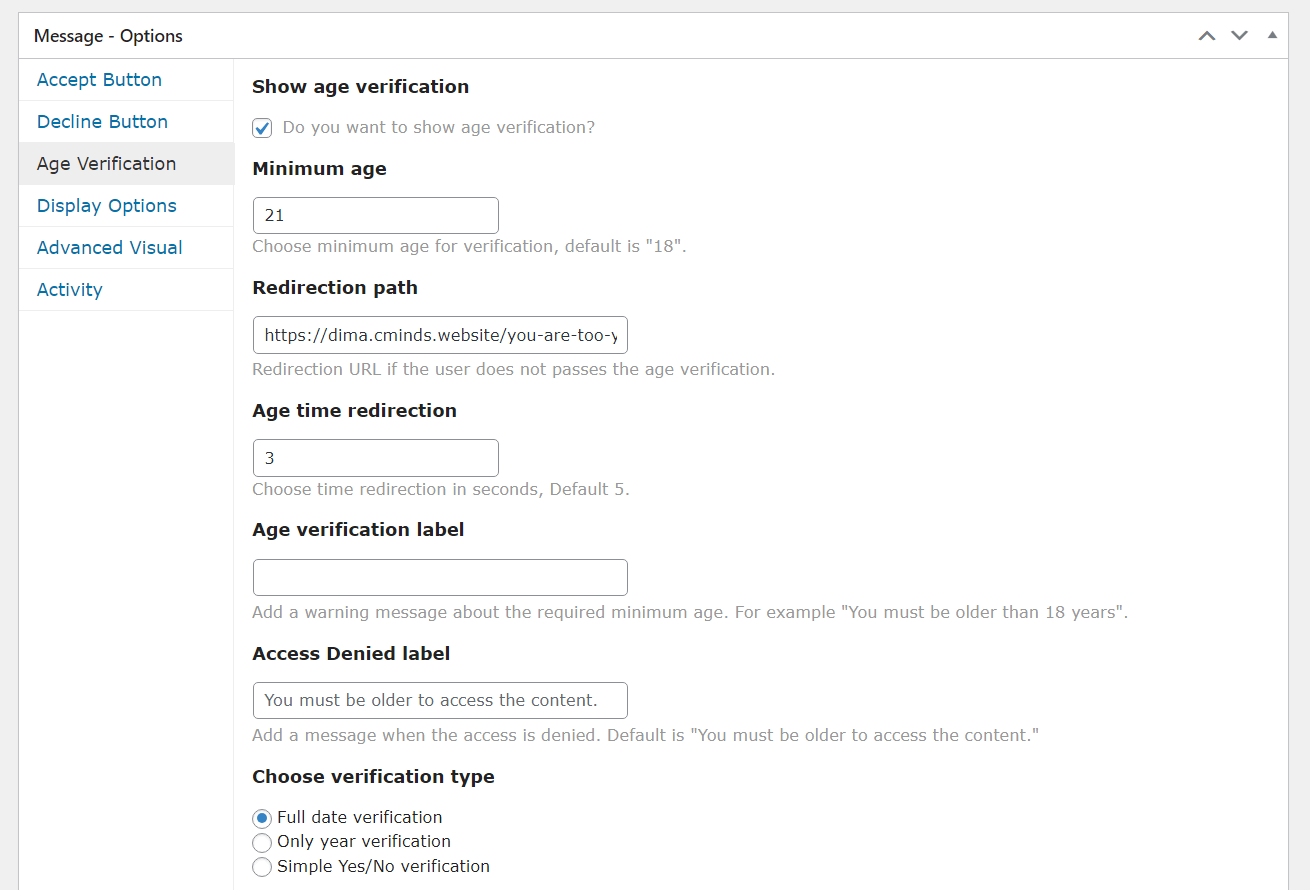
Age Verification Settings
A Seamless User Experience
A big part of what makes this plugin effective is how it balances protection with convenience. If a visitor doesn’t pass the check, you can automatically redirect them to a friendly “Access Restricted” page. If they do pass, their confirmation is saved, so they won’t have to go through the process again on their next visit.
That means legitimate users enjoy a smooth browsing experience, while your content stays secure. By making the popup both functional and visually appealing, you avoid frustrating visitors and instead reassure them that your site is well-managed.
Final Thoughts

Adding age verification to your WordPress site doesn’t need to be complicated. With the WordPress Disclaimer Plugin, you can protect your business, meet legal requirements, and still deliver a seamless browsing experience.
From strict date-based checks to quick Yes/No confirmations, the plugin adapts to your industry’s needs while keeping your design consistent and professional.